
Introduction (version 1.6)
Unit Calculator - version1.6 build 41
Thanks for your attention to Unit Calculator. I hope you find Unit
Calculator useful and find practical use for it.
UC is a unit converting application.
Unit Converter is a program that can help you in various ways.
What it does is; converting one type of unit to another type of unit within
the same dimensions. You can go visa versa, whatever you like.
Unit Converter has a quick search and find functionality. And you can use
Unit Converter in a handy minimized mode.
Furthermore Unit Converter can tell you a little about related units and
their proportions.
Unit Converter version 1.6 is freeware.
Unit Converter uses the RPNCalculator.dll © At Honig. You can use this dll
in other programs as well. It accepts complete RPN formula’s as input and
output’s the answer. It can even invert the complete RPN formula.
I hope you like it.
At Honig
At's Software
Note that when installing:
Although UC does not overwrite or change any windows files or information it
has to have access to the registry. Also UC uses RPNCalculator.dll which is
an activex dll and needs to be registered. Uninstall information is added.
 Introduction
License and
Liability
Program
explanation
 Main screen
Group definition
Find
Units and more
Origin of units
The value of units
Unit abbreviations
Country name abbreviations
Contacting At's
Software
Support
At's
Software website
RPN Calculator
RPN Calculator introduction
Unit Converter consists
of three major parts.
· The UC program itself
· The datafile containing all the conversions
· A RPN calculator doing the hard work
This Help first explains the workings of Unit Converter
Then help explains a little bit about Units information
and additional, some information about support contact and the RPN
calculator.
Please read and search this help or the website first before asking for
support.
Unit
Converter is freeware.
Notes on Unit Converter, further on described as UC
License agreement
This license applies to any version of UC or part of it. This means all
files in the installer or the installed version.
You may not change whole or part of this program or the accompanying file or
remove part of it.
You may not copy, zip or part of UC other then the complete installer.
You may only distribute the installer of UC. Distribution on any printed /
electronic media is only allowed after written permission by the author.
You may not distribute or let others distribute UC and charge money for it,
or charge distribution costs or any other fee for it.
This software and the accompanying files are provided "as is" and without
warranties as to performance or merchantability or any other warranties
whether expressed or implied.
No warranty of fitness for any particular purpose is offered.
The author is in no way responsible for damages coming from the direct or
indirect use of the a mentioned program or any other part of affiliated
programs or files.
No claims can be forwarded whatsoever.
The unit conversion factors are checked but no responsibility or claims
(direct or indirect), resulting through the use of UC can be accepted, be it
positive or negative. The user should check conversions on their correctness
before using them.
Please report misuse
Main screenGroup
DefinitionFind
As soon as you
start Unit Converter you are in the main screen of it. Here you can select
dimensions, units and do your calculations.
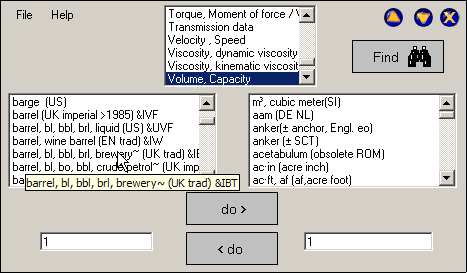
Units are always part of a 'dimension'. A dimension is a specific
combination of certain natural phenomena Top midst is the dimension
selector. This is a listbox where you select the dimension you want your
conversion to be done. When you hover over this listbox you can scroll right
away without the need of clicking it first. When the cursor is hovering
above the listbox you can type a character at the keyboard which will make
the list go to that part of the dimension list that starts with that
character. When you click the dimension you want the left and right
listboxes are filled with units from that dimension. You can select units in
the listboxes the same way as selecting a dimension. Hovering alone is
enough to make scrolling possible. Of course you can scroll by making use of
the regular scrollbar. When you have select a unit it's description has
become visible in the lower half of the main screen, right above the value
entry boxes. You have to select a unit in both listboxes. Now you can use
unit converter to convert from and to the unit you selected Enter the value
you want to convert, below it's unit description. This can be on either side
of Unit Converter, depending where your source unit is located. Then click
the arrow button located in between the value entry boxes. There are two of
them. Each pointing in the direction the conversion is done. Click the one
pointing opposite to where you have entered your value. The conversion will
show on the opposite side. When you click one the other arrow button nothing
should happen since that should result in the number you put there. Once you
have selected units to convert from and to, you can switch the Unit
Converter gui to a small version in which you can still make conversions,
but that does not occupy as much screen.


You can switch back to full mode using the full button

As in each application in windows you can minimize the Unit Converter
window. To do this click the minimize button.

You can reactivate Unit Converter like any other application by clicking
it's button in the windows taskbar. In the left upper part of the main
screen you find the menu. By clicking File once, you call the primary popup
menu.

This popup menu gives you two options: Load List and Exit. Load List
gives you the possibility to load a new units database without restarting. A
standard windows dialog-box will guide you to your selection. Exit will end
Unit Converter. This can also be accomplished by pressing the x button top
right.

Top left next to the File menu item you find Help.
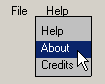
When you have clicked Help once a popup menu containing three items. First item is Help. Clicking this will guide you to this help. Second item is the about. Here you can check which version of unit converter you are running. Which database is loaded and which RPNcalculator you are using. Third item is Credits, This is where you can read the credits that go to people or institutes that contributed valuable information or freeware that were useful to the creation of Unit Converter.
You select this function by rightclicking an item that belongs to a group.
This can be recognized by the &xxx symbol at the end of the unit string in the listbox.
You can do this in the left listbox. Here you get a popupmenu containing the choice 'show group'
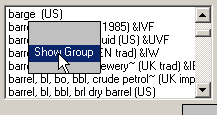
If you have rightclicked a unit that is not part of a group (not yet) you get a grayed out popup.
Here you get an overview of all units belonging to a group
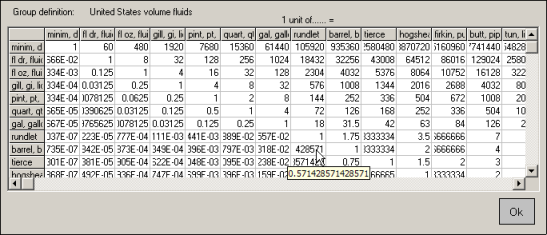
On to upper part of the screen is the group description.
The table contains all units in that group in both directions.
To find the conversion factor used, find your unit in the first row.
Then find the unit you want to know the conversion/relation in the left column.
From the unit in the upper row, go down that column to the selected row with the related unit.
Here you find the conversion factor you have to multiply the first row/unit with, to get the related row/unit.
If your table hold so many columns it can not show the entire value, go over it with your mouse.
A tooltiptext will popup holding the entire value.
If you don't know where to find your unit, don't know which dimension it is in but do know how to spell it, Find is useful to you. Select Find from the main screen.
The find screen will popup Type the text you search for in the textbox
in the upper part of the find screen. When you press Enter, the units
database is searched for the occurrence of that string. The results are
listed in the find-listbox.
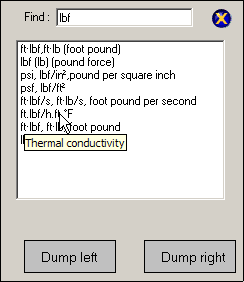
When you move your cursor over the varied found items in the listbox, you
get an automatic tool tip telling you which dimension it is from. Below the
listbox you find two quit self explainery buttons: Dump Left and Dump Right.
If you find the unit you were looking for in the listbox, you can select it
by clicking it once. After selection, by single clicking it, you can choose
whether you want this unit on the right or left side of the main unit
listboxes of the main screen, by selecting: Dump Left or Dump Right. A
standard double click on the preferred selection in the main listbox of the
find screen will automatically put that selection in the left unit listbox
of the main screen. After selection, the find screen disappears.
Origin of UnitsThe value
of unitsUnit abbreviationsCountry
name abbreviations
People have
always felt the urge to think in quantities. It brightens the abstract image
and makes it possible to weigh all kinds of things. How far is it, how
heavy, how long. Presumably because of that weight factors where introduced
quite soon in Human history. And because every habitat or society did this
the diversity is enormous. Lots of Units dissolved into each other and lots
of them have disappeared altogether.
But many remain. Units are almost as divers as Languages. Sometimes they
sound alike but mean something different. Most of the times they sound
different but mean the same. Most of the units are not unique to a region.
Luckily we all interpreted time as the same quantity,
or didn’t we?
So bigger and bigger regions started to use the same units. But the bigger
the region, the harder you get it to switch to a alternate quantity for the
same dimension. Napoleon persuaded a lot of people, but there still are a
lot of units for the same dimension.
Nowadays SI tries to set a standard, but history remains.
It is interesting to see what diverse units are, to find out how they
compare.
Sometimes we have to know, sometimes we like to know.
Units or their origin are not explained by Unit Converter. Explaining is of
course just as interesting, maybe even more. But this is not (yet?) done in
this program or it’s help.
If you want to have more information about a unit itself, it’s background or
history you can find plenty on the web.
The site of the University of North Carolina at Chapel Hill is a very good
place to start. Thanks go to Russ Rowlett who has done an immense job in
arranging and archiving them.
http://www.unc.edu/%7Erowlett/units/index.html
There are Units that are so much alive that they are constantly changing,
like money for example. In future versions I plan to embed them as well, but
you would need a open Internet connection or link to keep them up to date.
Then there are other units not implemented. That may be because:
· They have no (known) counterpart, so they are not incorporated because
there is nothing to convert them to.
· They have no solid background and values are to unsure to incorporate
them.
· They have no mathematical (known) relationship with counterparts so it is
impossible to include them
· My RPNCalculator is not yet able to use the conversion needed to convert.
Unit Converter is a freeware project and units are gathered from all over
the world. I try to check them whenever is possible, but sources differ
sometimes.
At this moment the number of incorporated units is far from complete, even
though there are several hundreds of units are available right now.
If you find any wrongly calculated units or know of missing units, please
let me know.
For information, suggestions and bug report about the program, feel free to
contact me.
If you have units to contribute please let me know. But always accompany
your additions with information which makes it possible to verify the
correctness.
Unit Converter
is a freeware project and units are gathered from all over the world. I try
to check them whenever is possible, but sources differ sometimes.
At this moment the number of incorporated units is far from complete, even
though there are several hundreds of units are available right now.
If you find any wrongly calculated units or know of missing units, please
let me know.
For information, suggestions and bug report about the program, feel free to
contact me.
If you have units to contribute please let me know. But always accompany
your additions with information which makes it possible to verify the
correctness.
symbols A B C D E F G H I J K L M N O P Q R S T U V W X Y Z
| symbols | |
| ' | min |
| '' | sec |
| '' | inch |
| A | |
| A | amphere |
| amp | amphere |
| a | are |
| ac | acre |
| asb | apostilb(s) |
| B | |
| B | brewster |
| C | |
| cal | calorie |
| cd | candela |
| cm | centimeter |
| D | |
| dg | degree |
| dm | decimeter |
| dyn | dyne |
| E | |
| F | |
| fm | femtometer |
| fc | foot candle |
| FNU | formazin nephelometric unit |
| FEU | forty-foot equivalent |
| fL | foot-Lambert(s) |
| ft | foot |
| G | |
| gr | gram |
| g | gram |
| H | |
| ha | hectare |
| I | |
| in | inch |
| J | |
| K | |
| km | kilometer |
| L | Lambert(s) |
| L | liter |
| l | liter |
| lm | lumen (emitted lumen per steradius) |
| lx | lux |
| M | |
| m | meter |
| ml | milliliter |
| mm | millimeter |
| min | minute |
| N | |
| N | newton |
| O | |
| P | |
| ph | phot |
| pt | point |
| Q | |
| R | |
| rad, | radian |
| S | |
| s | sec |
| sr | steradian (a solid angle which, having its vertex at the center of a sphere) |
| sq | square |
| T | |
| U | |
| V | |
| W | |
| W | watt |
| X | |
| Y | |
| yd | yard |
| Z | |
To keep the unit list in the main program orderly, country names are
abbreviated.
This is done according to ISO 3166: Country Names and Abbreviations.
All names have two indicators. Where it was necessary to use a abbreviation
not in ISO 3166 Unit Converter uses abbreviations existing out of three
indicators
A B C D E F G H I J K L M N O P Q R S T U V W X Y Z
| A | ||
| Aden | ADN | not ISO |
| Afghanistan | AF | |
| Albania | AL | |
| Algeria | DZ | |
| American Samoa | AS | |
| Andorra | AD | |
| Angola | AO | |
| Anguilla | AI | |
| Antarctica | AQ | |
| Antigua and Barbuda | AG | |
| Argentina | AR | |
| Aruba | AW | |
| Australia | AU | |
| Austria | AT | |
| B | ||
| Bahamas | BS | |
| Bahrain | BH | |
| Bangladesh | BD | |
| Barbados | BB | |
| Belgium | BE | |
| Belize | BZ | |
| Benin | BJ | |
| Bermuda | BM | |
| Bhutan | BT | |
| Bolivia | BO | |
| Botswana | BW | |
| Bouvet Island | BV | |
| Brazil | BR | |
| British Indian Ocean Territory | IO | |
| Brunei Darussalam | BN | |
| Bulgaria | BG | |
| Burkina Faso | BF | |
| Burma | BU | |
| Burundi | BI | |
| Byelorussia | BY | |
| C | ||
| Cameroon | CM | |
| Canada | CA | |
| Cape Verde | CV | |
| Cayman Islands | KY | |
| Central African Republic | CF | |
| Chad | TD | |
| Chile | CL | |
| China | CN | |
| Christmas Island | CX | |
| Cocos Islands | CC | |
| Colombia | CO | |
| Comoros | KM | |
| Congo | CG | |
| Cook Islands | CK | |
| Costa Rica | CR | |
| Cote D'Ivoire | CI | |
| Cuba | CU | |
| Cyprus | CY | |
| Czech Republic | CS | |
| D | ||
| Denmark | DK | |
| Djibouti | DJ | |
| Dominica | DM | |
| Dominican Republic | DO | |
| E | ||
| East Timor | TP | |
| Ecuador | EC | |
| England | EN | not ISO |
| Egypt | EG | |
| El Salvador | SV | |
| Equatorial Guinea | GQ | |
| Ethiopia | ET | |
| F | ||
| Falkland Islands | FK | |
| Faroe Islands | FO | |
| Fiji | FJ | |
| Finland | FI | |
| France | FR | |
| French Guiana | GF | |
| French Polynesia | PF | |
| French Southern Territories | TF | |
| G | ||
| Gabon | GA | |
| Gambia | GM | |
| Germany | DE | |
| Ghana | GH | |
| Gibraltar | GI | |
| Greece | GR | |
| Greenland | GL | |
| Grenada | GD | |
| Guadalupe | GP | |
| Guam | GU | |
| Guatemala | GT | |
| Guinea | GN | |
| Guinea-Bissau | GW | |
| Guyana | GY | |
| H | ||
| Haiti | HT | |
| Heard and McDonald Islands | HM | |
| Honduras | HN | |
| Hong Kong | HK | |
| Hungary | HU | |
| I | ||
| Iceland | IS | |
| India | IN | |
| Indochina | IDC | not ISO |
| Indonesia | ID | |
| Iran | IR | |
| Iraq | IQ | |
| Ireland | IE | |
| Israel | IL | |
| Italy | IT | |
| J | ||
| Jamaica | JM | |
| Japan | JP | |
| Jordan | JO | |
| K | ||
| Kampuchea | KH | |
| Kenya | KE | |
| Kiribati | KI | |
| Korea | KP or KR | |
| Kuwait | KW | |
| L | ||
| Laos | LA | |
| Lebanon | LB | |
| Lesotho | LS | |
| Liberia | LR | |
| Libya | LY | |
| Liechtenstein | LI | |
| Luxembourg | LU | |
| M | ||
| Macau | MO | |
| Madagascar | MG | |
| Malawi | MW | |
| Malaysia | MY | |
| Maldives | MV | |
| Mali | ML | |
| Malta | MT | |
| Marshall Islands | MH | |
| Martinique | MQ | |
| Mauritania | MR | |
| Mauritius | MU | |
| Maya | MAY | not ISO |
| Mexico | MX | |
| Micronesia | FM | |
| Monaco | MC | |
| Mongolia | MN | |
| Montserrat | MS | |
| Morocco | MA | |
| Mozambique | MZ | |
| N | ||
| Namibia | NA | |
| Nauru | NR | |
| Nepal | NP | |
| Netherlands | NL | |
| Netherlands Antilles | AN | |
| Neutral Zone | NT | |
| New Caledonia | NC | |
| New Zealand | NZ | |
| Nicaragua | NI | |
| Niger | NE | |
| Nigeria | NG | |
| Niue | NU | |
| Norfolk Island | NF | |
| North Borneo | NBO | not ISO |
| Northern Mariana Islands | MP | |
| Norway | NO | |
| O | ||
| Oman | OM | |
| P | ||
| Pakistan | PK | |
| Palau | PW | |
| Panama | PA | |
| Pangaea | GE | |
| Papua New Guinea | PG | |
| Paraguay | PY | |
| Pegu | PGU | not ISO |
| Persia | PSA | not ISO |
| Peru | PE | |
| Philippines | PH | |
| Pitcairn | PN | |
| Poland | PL | |
| Portugal | PT | |
| Puerto Rico | PR | |
| Q | ||
| Qatar | QA | |
| Quebec | QC | |
| R | ||
| Reunion | RE | |
| Roman | ROM | not ISO |
| Romania | RO | |
| Rwanda | RW | |
| S | ||
| Sabah | SBH | not ISO |
| Saint Kitts and Nevis | KN | |
| Saint Lucia | LC | |
| Saint Vincent and the Grenadines | VC | |
| Samoa | WS | |
| San Marino | SM | |
| Sao Tome and Principe | ST | |
| Sarawak | SWK | not ISO |
| Saudi Arabia | SA | |
| Scotland | SCT | not ISO |
| Senegal | SN | |
| Seychelles | SC | |
| Sierra Leone | SL | |
| Singapore | SG | |
| Solomon Islands | SB | |
| Somalia | SO | |
| South Africa | ZA | |
| Spain | ES | |
| Sri Lanka | LK | |
| St. Helena | SH | |
| St. Pierre and Miquelon | PM | |
| Sudan | SD | |
| Suriname | SR | |
| Svalbard and Jan Mayen Islands | SJ | |
| Swaziland | SZ | |
| Sweden | SE | |
| Switzerland | CH | |
| Syrian Arab Republic | SY | |
| T | ||
| Taiwan | TW | |
| Tanzania | TZ | |
| Thailand | TH | |
| Togo | TG | |
| Tokelau | TK | |
| Tonga | TO | |
| Trinidad and Tobago | TT | |
| Tunisia | TN | |
| Turkey | TR | |
| Turks and Caicos Islands | TC | |
| Tuvalu | TV | |
| U | ||
| Uganda |
UG | |
| Ukraine |
UA | |
| United Arab Emirates | AE | |
| United Kingdom | GB | |
| United States Minor Outlying Islands | UM | |
| Uruguay | UY | |
| V | ||
| Vanuatu | VU | |
| Vatican City State | VA | |
| Venezuela | VE | |
| Viet Nam | VN | |
| Virgin Islands (British) | VG | |
| Virgin Islands (USA) | VI | |
| W | ||
| Wallis and Futuna Islands | WF | |
| Western Sahara | EH | |
| X | ||
| Y | ||
| Yemen | YE or YD | |
| Yugoslavia (Former) | YU | |
| Z | ||
| Zaire | ZR | |
| Zambia | ZM | |
| Zimbabwe | ZW | |
SupportAt's
Software website
For support you can e-mail me at:
athonig@12move.nl
I will try to react as soon as possible.
This program is tested on Windows XP and Windows 2000, both a trademark of
the Microsoft corporation. They seem to work fine on both platforms.
If you like you can visit my
website.
You can check for newer versions of Unit Converter or you can check out
other programs that are there for download.
Please visit: http://home.deds.nl/~jh1996/AHH/home.htm
RPN Calculator introduction
You might be new to RPN, or maybe you are already familiar with it, in any
case this RPN Calculator might be of interest for you.
RPN Calculator is an dll which comes with the Unit Converter program. But it
is not limited to it. You can use it in other application as well.
to be continued